AI GIF Generator: Turn Text or a Picture into an Animated GIF
Describe a moment, or upload a drawing, a mascot or a photo, and get back a real looping GIF: a reaction, a sticker, a character that waves. Every frame is drawn by GPT Image 2.6, the image model OpenAI released on November 4, 2026 with GIF output built in. Choose how many frames, how fast it plays and its shape.
One GIF per run. GIFs stay private in your account, with no watermark. A GIF the model declines costs nothing.
ToonBee AI runs GPT Image 2.6 through fal’s API. This is not ChatGPT or Giphy, and ToonBee AI is not affiliated with OpenAI.
AI generated GIF examples, with their prompts
Cartoon characters, mascots, stickers and reaction GIFs, all AI generated. Open a prompt and send it to the box to make your own version.
- From text
Chibi meltdown
A kawaii office worker cries big cartoon tears at a falling chart: a reaction GIF for bad days.
- From text
Chibi celebration
The same character, now cheering and throwing paper money as the chart soars.
- From a picture
Sketch to cartoon
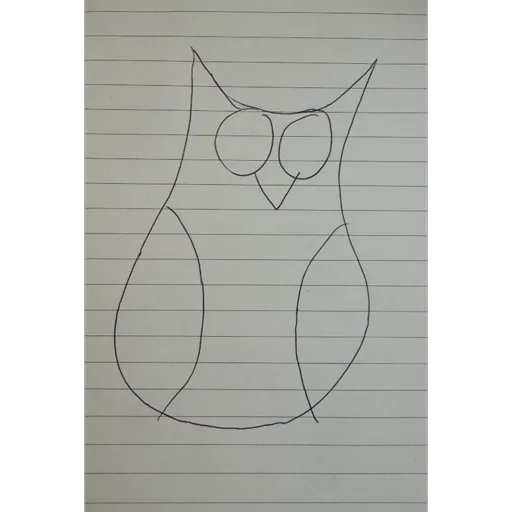
A pen doodle on lined paper becomes a clean cartoon owl that waves hello.
- From text
Cartoon scene loop
A storybook windmill whose sails keep turning, from a one-line prompt.
- From a picture
Mascot wave
A flat robot mascot waves and bobs without changing its style.
- From text
Felt fox
A needle-felted fox in a scarf, swaying on a wool meadow: handmade texture, frame after frame.
- From text
Sale sticker
A comic-burst SALE badge that pops and wiggles, ready for a banner or a story.
- From text
Clay character walk
A chunky 3D clay character walking in place with a coffee: a looping walk cycle.
- From text
Typing cat
An annoyed orange cat hammering a keyboard: the classic “working hard” GIF.
- From text
Slow clap
A deadpan sarcastic slow clap, the reaction GIF for every group chat.
Animate your own drawing, mascot or character
Add a picture and GPT Image 2.6 redraws it frame by frame in motion, keeping its shapes and colors. Here a quick pen sketch of an owl became a finished cartoon owl that waves. It works the same with a mascot, a sticker, a character you made, or a photo.
Start from words or from a picture
Text to GIF with AI
Type what happens, in order: who, what they do, and how it ends so the loop closes. GPT Image 2.6 designs the character and the scene and draws every frame. Good for reactions, memes, stickers and ideas you have no picture for.
Picture to GIF
Upload a drawing, a logo mascot, a sticker or a photo and say how it should move. The GIF keeps your picture’s look and framing, so your own character or brand stays recognizable.
How to make a GIF with AI
- 1
Describe the motion
Write who is in the GIF and what they do, start to finish. Pick a style (cartoon, chibi 3D, anime, clay, pixel art) or describe your own. Or add a picture to animate.
- 2
Pick frames, speed and shape
Eight frames at normal speed suits most GIFs. Use 12 frames for smoother motion and square for stickers or 9:16 for stories.
- 3
Generate and download
The price is on the button before you start. The GIF plays in the box when it is ready, and downloads as a real .gif you can post anywhere.
What people make with an AI GIF generator
Reaction GIFs and memes
Your own take on a slow clap, a happy dance or a meltdown, for chats, comments and Discord.
Stickers and emoji
Small square loops of a character waving, laughing or saying hi.
Mascots and brand loops
Make a logo mascot wave, a sale badge pop or a product spin for a site or a campaign.
Character animation tests
Try how a character moves, a walk cycle or an expression, before you make it into a full cartoon.
Prompt tips for better AI GIFs
- Describe the motion as a short sequence: ‘notices the chart, eyes widen, cries, wipes tears’.
- End where you started, or say ‘seamless loop’, so the last frame flows into the first.
- Keep one subject and a fixed camera: ‘static camera, plain background’. Busy scenes jitter.
- Name a style the model draws consistently: chibi 3D, flat cartoon, clay, felt, pixel art.
- Put any words in quotes, exactly as they should read, and keep them short: ‘SALE’, ‘HI!’.
- With a picture, say what must stay: ‘same character, same style, only the arm moves’.
AI GIF generator pricing and free credits
A GIF is priced by its number of frames and quality, and the price is on the button before you start. New accounts get 100 free credits: 2 GIFs of 8 frames at high quality, or more at medium or with fewer frames. Animating your own picture costs the same as drawing from text.
| Frames | Medium | High |
|---|---|---|
| 4 | 15 credits | 18 credits |
| 6 | 23 credits | 27 credits |
| 8 | 30 credits | 36 credits |
| 12 | 45 credits | 54 credits |
More credits come in packs and plans; the smallest pack is 4,000 credits for $49, about 111 GIFs of 8 frames at high quality. Credits also work for pictures, videos and story videos.
AI GIF generator vs a regular GIF maker
Most GIF makers, like Giphy, ezgif or Canva, cut a GIF out of a video or stitch photos you already have. An AI GIF generator draws a new animation from words or a single picture.
| Regular GIF maker | This AI GIF generator | |
|---|---|---|
| You start from | A video clip or several photos | A prompt, or one picture |
| What it does | Trims, crops, adds captions and converts | Draws every frame of a new animation |
| Good for | Clips from a show, a game or your phone | Characters, stickers, mascots and scenes that do not exist yet |
| Cost | Usually free | Credits per GIF, shown before you start |
This page does not convert a video into a GIF or add text over an existing GIF. For those, a regular GIF maker is the right tool.
AI GIF generator FAQ
What is an AI GIF generator?
A tool, also called an AI GIF maker or AI GIF creator, that draws a new animated GIF from a text prompt or a single picture, instead of cutting one out of an existing video. This one runs GPT Image 2.6, which draws every frame of the GIF itself.
Is this AI GIF generator free?
You can start free: new accounts get 100 credits, enough for 2 GIFs of 8 frames at high quality, with no watermark. After that a GIF costs 15 to 54 credits depending on frames and quality.
How do I turn text into a GIF?
Type what happens in the box, in order, with a style, and press Generate GIF. For example: ‘A cartoon dog in sunglasses nods to the beat, flat colors, plain background, seamless loop’.
Can I animate my own character or drawing?
Yes. Add one picture, a drawing, mascot, sticker or photo, and describe how it should move. The GIF keeps the picture’s look and its shape.
How long is the GIF?
A GIF has 4 to 12 frames, each shown for 80, 120 or 200 milliseconds, so one loop lasts about a third of a second to 2.4 seconds and then repeats. For a longer clip with sound, use a video generator instead.
What size is the GIF?
About 816 × 816 pixels for a square GIF; the other shapes have the same number of pixels per frame, from 9:16 to 16:9.
Can ChatGPT make GIFs?
Yes, since Images 2.6 came out on November 4, 2026, ChatGPT can make animated GIFs. This page runs the same model, GPT Image 2.6, through the API, so you can set the number of frames, the speed and the shape, and it needs no ChatGPT plan.
Does the GIF have a watermark?
No. You download a plain .gif file with no watermark, yours to post on social media, in chats or on a website.
Can it make a GIF from a video?
No. This tool draws new animations from a prompt or a picture. To turn a video clip into a GIF, use a converter such as ezgif or Giphy.
Why does my GIF flicker or change between frames?
Each frame is drawn by the model, so busy scenes and moving cameras can drift. Keep one subject, a plain background and ‘static camera’ in the prompt, and use high quality.
Why was my GIF declined?
OpenAI’s safety system screens every prompt and picture and sometimes declines harmless ones. A declined GIF costs no credits. Rewording the prompt plainly usually helps.
Make your first AI GIF
Type a moment or add a picture, and see the price before you generate.
Open the GIF generatorOutils associés
D’autres pages qui ouvrent le même studio, préparé pour un autre type de vidéo.
- Générateur d’animation IADes clips animés courts, ou une image fixe qui prend vie.
- Faire parler un dessinFaites parler un dessin avec l’IA : une image, une réplique, il parle.
- Dessin animé IATransformez une idée ou un script en dessin animé avec voix off.
- Photo en dessin animéTransformez une photo en dessin animé : 3D, 2D, BD ou chibi.