
AI Cartoon Video Prompts: 36 Copy-Ready Examples by Style
Copy-ready AI cartoon video prompts for 3D, 2D, anime, clay, kids and bedtime cartoons, a simple formula for writing your own, and story prompts that turn one idea into a whole narrated cartoon.
Most cartoon video prompts that disappoint fail in the same way: they ask for "a cute cartoon" and leave the model to guess the rest. The model guesses a style, a character, a camera and a mood, and what comes back looks like everyone else's AI cartoon.
This guide gives you prompts you can paste as they are, grouped by style — 3D, 2D, anime, clay, kids, bedtime and more — and explains what each group needs to come out well. It also covers the second kind of cartoon prompt that most prompt lists skip: the story prompt, which turns one idea into a whole narrated cartoon instead of a single five-second shot.
Quick answer
A good AI cartoon video prompt names, in this order:
- The cartoon style — "3D animated film look", "flat 2D cartoon", "clean anime", "clay stop-motion".
- One character with fixed details — species or age, colours, one piece of clothing that is easy to recognise.
- The setting and the light — where, what time of day, what the light does.
- One main action — a physical movement you could act out.
- The camera — one move, such as "slow push in" or "the camera follows from the side".
- The mood in visual terms — "bright saturated colours", "soft pastel palette", "warm lamplight".
3D animated film look: a small round robot with a dented blue shell and one glowing yellow eye rolls through a sunlit greenhouse, stops in front of a sprouting seed, and leans in to look at it. Warm morning light through glass panes, dust floating in the air. Slow push in. Bright, soft colours.
That is a clip prompt: one shot, a few seconds long. If you want a cartoon with a beginning, a middle and an end, you need a story prompt instead — skip to story prompts.
Two kinds of cartoon video prompt
| Clip prompt | Story prompt | |
|---|---|---|
| What you get | One shot, usually 5–10 seconds | A narrated cartoon from 15 seconds to 15 minutes |
| What you describe | Exactly what is on screen: style, character, action, camera, light | What happens: the hero, what they want, what goes wrong, how it ends |
| Where it works | Any text-to-video model, such as the AI animation generator | A story generator that writes the script and draws the scenes, such as the AI cartoon video generator |
| Character consistency | Up to you: repeat the same description in every prompt | Handled by the tool: the cast is fixed once and reused in every scene |
Most of this guide is clip prompts, because those are what people copy and adapt. The story section near the end shows how much less you need to write when the tool does the shot-by-shot work for you.
The cartoon clip formula, explained
Put the style first. Video models weigh the start of a prompt heavily. "3D animated film look: …" sets everything that follows; "… in a 3D style" at the end often gets diluted by the realistic words before it.
Describe the style, don't just name a studio. "Pixar style" or "Disney style" works on some models and gets ignored or refused on others. Describe what makes the look: "3D animated film look, soft rounded shapes, big expressive eyes, subsurface-lit skin, gentle bounce in every movement". That carries across every model.
Give the character two or three details that cannot change. "A fox" will be a different fox every time. "A small red fox with a cream-tipped tail and a green knitted scarf" is the same fox in the next prompt too.
One action per clip. Five to ten seconds is enough for one thing to happen. "The penguin slips, spins and lands on its bottom" works; "the penguin goes to school, makes friends and wins a race" gets rushed into nonsense.
Write motion as movement, not adjectives. "Funny" and "energetic" do little. "Bounces twice, then flops onto the bed with arms out" gives the model something to animate.
One camera move. Static, slow push in, pull back, pan, tracking shot from the side, or a low angle looking up. Stacking three moves usually produces a wobbling camera.
Say what keeps it a cartoon. Realistic lighting words ("photoreal", "8K skin texture", "film grain") pull 3D cartoons toward live action. Swap them for "clean shapes", "bold outlines", "flat colour fills" or "soft cartoon shading" depending on the style.
Words that set the cartoon style
| You want | Write |
|---|---|
| 3D animated feature | 3D animated film look, soft rounded shapes, big expressive eyes, soft global illumination |
| Cute 3D character | cute 3D cartoon character, oversized head, glossy toy-like materials |
| Flat 2D cartoon | flat 2D cartoon, bold outlines, flat colour fills, simple shapes, limited palette |
| Saturday-morning cartoon | 2D TV cartoon, thick black outlines, bright primary colours, squash-and-stretch motion |
| Anime | clean anime, cel shading, crisp line art, expressive eyes, smooth limited animation |
| Watercolor storybook | watercolor storybook illustration, soft paper texture, gentle washes of colour |
| Clay / stop-motion | handmade clay stop-motion, visible thumbprints, slightly jerky frame-by-frame motion |
| Paper cut-out | paper cut-out animation, layered coloured paper, soft drop shadows |
3D cartoon video prompts
3D is the look most people mean by "AI cartoon video". It works best when the prompt leans on shape and light — round forms, soft shadows, a warm rim light — and keeps the character simple enough to stay readable while it moves.
1. Pilot in the clouds (vertical, for Shorts and Reels)
Vertical 3D cartoon scene: a young pilot in a pink helmet and a colourful flight suit soaring arms-wide through golden sunlit clouds, warm rim light, slow rise toward camera.
2. Pizza night
A round teal cartoon creature with orange spots sitting in a warm diner booth, eyes closed in delight as it bites a slice of pepperoni pizza, cheese stretching, bokeh pendant lights behind.
3. The cosy café
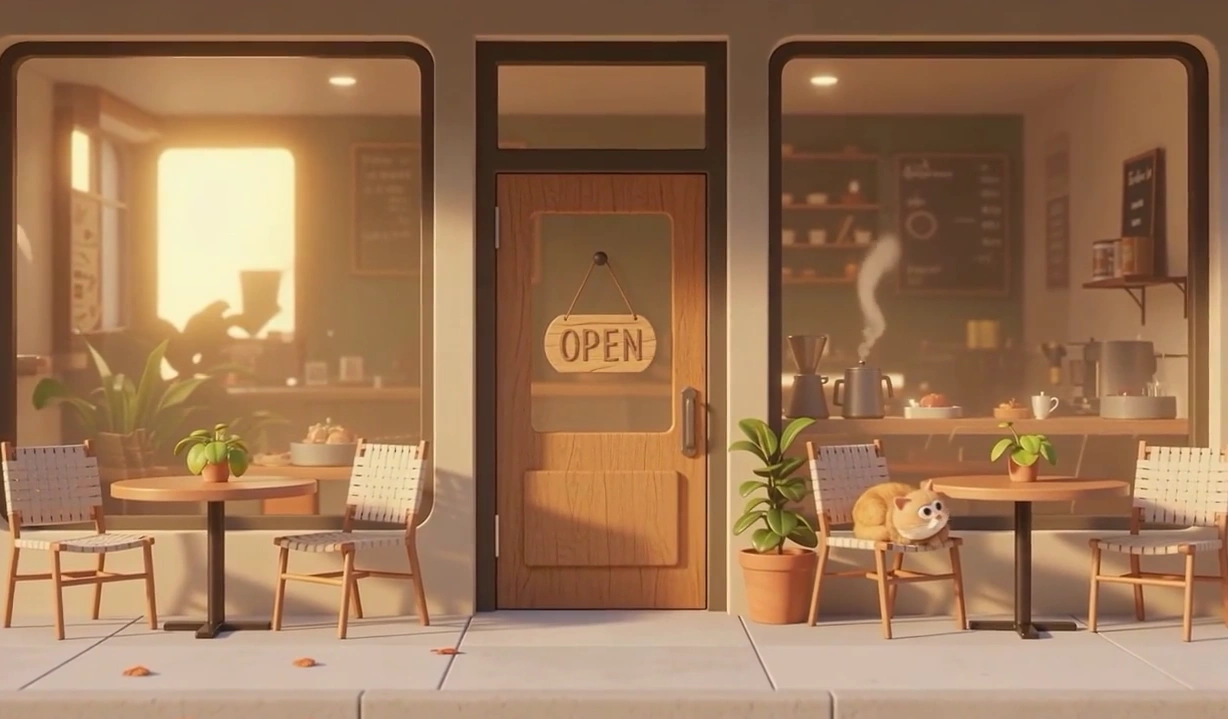
A cosy 3D cartoon cafe storefront at golden hour, OPEN sign hanging on the wooden door, potted plants and bistro tables on the pavement, a ginger cat asleep on one of the chairs, steam rising inside.
4. First snow
3D animated film look: a small boy in a yellow puffer coat and a red bobble hat catches his first snowflake on his tongue in a quiet village square at dusk. His eyes go wide, then he laughs. Warm streetlights, soft falling snow, slow push in. Rounded shapes, soft shading.
5. The robot gardener
3D animated film look: a small round robot with a dented blue shell and one glowing yellow eye rolls through a sunlit greenhouse, stops in front of a sprouting seed, and leans in to look at it. Warm morning light through glass panes, dust floating in the air. Slow push in. Bright, soft colours.
What makes 3D prompts work: a single light source you can name (golden hour, a lamp, a window), materials described as toy-like or soft, and a character with an oversized feature — big eyes, a big head, a big hat. Leave out "realistic", "hyper-detailed" and skin texture words. For a whole story in this look, the AI 3D cartoon video generator keeps the cast the same across every scene.
2D cartoon video prompts
Flat 2D is the classic explainer and TV-cartoon look. The prompt needs to say flat clearly, or the model adds depth and shading and you end up halfway to 3D. Outlines, flat fills and a small palette are the three signals.
6. The floating scientist
Flat 2D cartoon scene: a scientist with a huge orange and blue afro in a yellow lab coat and goggles floating in her laboratory, chalk equations and winged geometric solids drifting around her, pastel palette, gentle bobbing motion.
7. Retro game night
Warm 2D cartoon scene: two children sitting cross-legged on a shag rug playing a retro console on a CRT television, lava lamp and stacked game boxes beside them, cosy 90s living room palette.
8. The creator at work
Flat 2D cartoon scene: a bearded creator in a grey blazer seated at a white desk with a laptop, speaking to a DSLR on a tripod, bookshelf and framed prints softly blurred behind.
9. Saturday-morning chase
2D TV cartoon, thick black outlines, bright primary colours: a skinny orange cat sprints after a grey mouse across a kitchen floor, skids on a rug, and slams into the fridge, which wobbles. Squash-and-stretch motion, the camera tracks from the side. Simple painted background.
What makes 2D prompts work: "flat", "bold outlines" and a named palette (pastel, primary colours, 90s, muted earth tones). Keep backgrounds simple — "simple painted background" or "softly blurred behind" — so the character reads clearly.
Anime cartoon video prompts
Anime clips come out best when the motion is restrained and specific: hair and cloth in the wind, a slow head turn, petals drifting. Big full-body action tends to morph. Add "limited and controlled" or "no morphing" to keep the line art steady.
The two clips below were animated on MiniMax H3 Max from still drawings, so their prompts describe only the motion — the still already fixed the character and the scene. For text-only generation, put the style, character and setting in front of the motion, as in prompts 12 and 13.
10. Rooftop swordswoman (motion prompt)
Her red scarf and silver hair stream in a strong wind, cherry petals drift past, she slowly turns her head toward the camera and raises the katana; the camera pushes in gently. Smooth anime motion, limited and controlled, no morphing.
11. The fox spirit (motion prompt)
Grass and wildflowers sway in a summer breeze, the clouds drift slowly, the white fox spirit's tail glows softly and it hops onto the fence, the boy points toward the sea and smiles. Calm, gentle anime motion.
12. Rainy train platform (text only)
Clean anime, cel shading, crisp line art: a high-school girl with short black hair and a navy blazer waits alone on a rainy countryside train platform at dusk. She lowers her umbrella, looks up at the clearing sky and smiles. Raindrops slow, the camera pulls back slowly. Soft orange and blue light, smooth limited animation.
13. Storm dragon (text only)
Anime fantasy, cel shading: lightning flashes across the clouds above stone ruins, a storm dragon coils and roars, a heroine in a blue cape plants her feet and lifts her spear as rain sweeps across the ruins. The camera tilts up toward the dragon. Weighty, dramatic anime motion, no morphing.
For whole anime stories rather than single shots, see the AI anime video generator.
Clay and stop-motion prompts
Clay looks charming partly because it is imperfect. Ask for the imperfections: thumbprints, slightly uneven shapes, frame-by-frame motion. Without them, many models produce something closer to smooth 3D.
14. The clay baker
Handmade clay stop-motion: a plump clay hedgehog baker in a tiny white apron pulls a tray of lumpy cookies out of a brick oven and sniffs them proudly. Visible thumbprints on the clay, slightly jerky frame-by-frame motion, warm kitchen light, static camera.
15. Rainy day snail
Plasticine stop-motion: a bright green clay snail with a striped shell slides along a wet garden wall while raindrops made of clear resin plop around it. It stops, pulls its eyes in, then peeks out again. Soft overcast light, macro framing, slightly uneven handmade shapes.
16. Clay space trip
Clay toy animation: a small clay astronaut with a round helmet and orange boots hops across a cratered clay moon, kicks up grey crumbs of clay, and waves at a blue clay Earth in the black sky. Frame-by-frame motion, bright toy colours, slow pan right.
Kids cartoon video prompts
For children's cartoons, the prompt needs to describe safe and warm in visual terms: rounded shapes, bright but soft colours, friendly faces, nothing sudden. Keep the action gentle and readable — a small surprise, a small success.
17. The brave little penguin
Bright 3D cartoon for young children: a small penguin in a red swim ring stands at the edge of an icy pool, takes a deep breath, and hops in with a tiny splash, then bobs up smiling. Soft rounded shapes, friendly big eyes, clear blue water, gentle camera push in.
18. Counting ducks
Flat 2D cartoon for preschoolers: five yellow ducklings waddle in a line across a green meadow toward a pond, each one hopping in one after another. Simple shapes, soft pastel colours, big clear outlines, static wide shot.
19. Tooth-brushing time
Cute 3D cartoon: a little hippo in striped pyjamas brushes its big teeth in front of a bathroom mirror, makes a foamy grin, and gives a thumbs-up to its reflection. Warm bathroom light, soft shading, cheerful colours, medium shot.
20. The kite
Children's book illustration style, softly animated: a girl with two braids and a yellow raincoat runs up a grassy hill as her red kite lifts into a windy blue sky full of round white clouds. Grass ripples in the wind, the camera follows from the side.
If you want whole stories for children rather than single clips, the AI children's story generator writes and draws them with a fixed cast.
Bedtime story cartoon prompts
Bedtime cartoons need the opposite of most video advice: slow, quiet, low contrast. Use night colours, a single soft light source, and actions that wind down rather than build up.
21. The moon and the bear
Watercolor storybook illustration, softly animated: a small brown bear in a knitted nightcap sits on a hilltop and waves goodnight to a smiling crescent moon. Fireflies drift slowly, the grass sways gently. Deep blue night palette, soft glow, very slow pull back.
22. Lantern boat
Gentle 2D storybook animation: a little mouse in a walnut-shell boat floats down a calm stream at night, holding a tiny paper lantern. Reflections ripple on the water, reeds sway, stars twinkle. Muted blues and warm lantern light, slow tracking shot from the side.
23. Falling asleep
Soft 3D cartoon, warm and quiet: a sleepy bunny curls up in a basket of blankets beside a window, yawns, and closes its eyes as snow falls outside. Dim lamplight, low contrast, nothing sudden, static camera.
The AI bedtime story generator is built for exactly this: a calm narrated story from one line, in a soft illustrated style.
Funny, animal and object cartoon prompts
Comedy in a five-second clip is all timing: a setup, then one thing going wrong. Write the beat in order, and give the punchline its own clause.
24. The overconfident cat
3D cartoon: a fluffy grey cat crouches on a kitchen counter, wiggles its bottom, and leaps toward the top of the fridge — and misses, sliding slowly down the fridge door with its claws squeaking. Bright kitchen light, static camera, comic timing.
25. The dog who hates baths
Flat 2D cartoon: a scruffy brown dog sees a bathtub full of bubbles, freezes, and slowly backs out of the bathroom, ears flat, eyes wide. Bold outlines, bright colours, the camera holds still.
26. Grumpy lemon
Cute 3D cartoon: a little lemon with tiny arms and a grumpy face sits on a breakfast table while a cheerful strawberry bounces around it. The lemon rolls its eyes, then cracks a small smile. Soft morning light, glossy toy-like materials, slow push in.
27. The office plant
Flat 2D cartoon: a small potted cactus on an office desk leans further and further toward a sunny window while the office worker beside it is busy typing, until the pot tips over with a thud. Muted office palette, static medium shot.
Educational and explainer prompts
Explainer cartoons work when one character shows one idea. Put the concept on screen as an object — a chalk diagram, a model, a chart — rather than asking the model to explain it.
28. The bee teacher
A friendly 3D cartoon bee hovering beside a wooden blackboard in a sunlit garden, pointing to a chalk diagram of the law of gravity, hydrangeas and a picket fence behind, shallow depth of field.
29. The office debate
Two 3D cartoon office workers in suits mid-conversation beside a cubicle, one standing and sceptical, one seated taking notes, glass tower windows behind, flat daylight.
30. How plants drink
Flat 2D educational cartoon: a cutaway of a sunflower shows blue water droplets with small smiling faces climbing up through the stem from the roots to the leaves. Clean outlines, white background, bright greens and blues, slow tilt up following the droplets.
For narrated lessons, the AI explainer video maker builds the whole video in whiteboard, flat vector and poster styles.
Story prompts: one idea, a whole cartoon
Clip prompts give you shots. To get a finished cartoon — several scenes, the same characters throughout, a narrator and music — you either stitch dozens of clips by hand or use a tool that starts from the story.
In ToonBee AI's AI story video generator, the prompt is the story, not the shot. You type an idea (up to 5,000 characters) or paste a finished script (up to 9,000), pick a style, a length and a 16:9 or 9:16 frame, and the tool writes the script, fixes the cast, splits the story into scenes, writes an image prompt for each scene, draws them and animates them. You can open and edit any scene's image prompt before anything moves.
The story prompt formula
A story prompt that produces a good cartoon covers five things in a few sentences:
- Who — the hero, with one or two details: "a shy penguin named Pip who is afraid of water".
- What they want — "wants to join his friends at the swimming race".
- What gets in the way — "every time he reaches the edge, he freezes".
- The turn — "a little fish shows him that the water holds you up".
- How it ends, and the tone — "he swims the race and comes last, happily. Gentle and funny, for ages 4–7."
The style, length and frame are picked as settings, so they do not need to be in the text.
Story prompts to copy
31. Kids' adventure
A shy penguin named Pip is afraid of water and hides whenever his friends go swimming. When the big swimming race comes, he freezes at the edge of the ice. A small orange fish tells him the water will hold him up if he trusts it. Pip jumps in, swims the race and finishes last — and everyone cheers anyway. Gentle and funny, for ages 4–7.
32. Bedtime
A sleepy little cloud named Puff drifts over a village at night, looking for a place to rest. The wind is too busy, the mountains are too cold, and the moon is too bright. Finally a field of soft lavender hums a lullaby, and Puff settles over it and falls asleep. Calm and slow, a bedtime story for young children, ending with the whole village asleep.
33. Fable with a moral
A proud rooster believes the sun rises because he crows. One morning he oversleeps, wakes in a panic, and runs outside — and the sun is already up. The old farm dog laughs kindly and tells him everyone has a job, but no one runs the sky. The rooster crows anyway, a little more humbly. A short fable with the moral at the end.
34. Funny short for Shorts or TikTok
A very serious cat is determined to catch the red dot on the wall. It plans, it stalks, it pounces — and the dot is on its own back. The cat spins in circles until it gets dizzy and falls asleep, and the dot quietly switches off. Thirty seconds, fast and silly, vertical.
35. History, told simply
Tell the story of how the first lighthouse at Alexandria was built, for curious ten-year-olds: why sailors needed it, how the fire at the top was kept burning, and how big it was compared with things they know today. Warm, wonder-filled narration, three to four minutes.
36. A personal story
A birthday story for my daughter Mia, who is turning seven and loves foxes and the colour purple. Mia finds a purple fox in the garden who invites her to a secret party in the woods, where all the animals have made her a cake. She blows out the candles and wishes that every birthday could be this magical. Sweet and short, under one minute.
Tips for story prompts
- Write what happens, not how it looks. The tool writes the image prompts for each scene; your job is the plot. "The rooster oversleeps and panics" is better input than "medium shot of a rooster".
- Write it as narration. Story videos are told by a narrator, so a story that reads well aloud makes the best video. If you paste your own script, every word is spoken exactly as written, so read it aloud once before you start.
- Name the audience and the length. "For ages 4–7", "for curious ten-year-olds", "under one minute" change the vocabulary, the pacing and how many scenes you get.
- Describe your characters yourself if you care how they look. In the Characters step you can add a character from your own description; once it is approved, it is drawn the same way in every scene.
- Fix single scenes, not the whole story. If one picture is wrong, edit that scene's image prompt and redraw it, rather than starting over.
Keeping a character the same across clips
If you are making several clips by hand, consistency comes from repetition. Write a fixed character block once and paste it into every prompt, unchanged:
Pip, a small round penguin with a pale blue belly, a short orange beak and a red knitted scarf with white stripes
Then build each clip around it: style first, the character block, then the setting, the action and the camera. Change everything except the block. Even so, details drift between separate generations — this is the main reason a story tool that locks the cast once is easier for anything longer than a few shots.
Common mistakes
- Too many actions. One clip, one action. Split the rest into more clips or more scenes.
- Realistic words in a cartoon prompt. "Photorealistic", "8K", "film grain" and "skin pores" fight the cartoon look.
- Only a studio name for the style. Describe the look; a studio name alone is unreliable across models.
- Abstract moods. "Magical" and "epic" are vague. "Fireflies drifting", "a low camera looking up" are not.
- Text on screen. Signs and labels often come out garbled. Keep them to one short word, like the "OPEN" sign in prompt 3.
- Asking for a story in one clip. A five-second clip cannot hold a plot. Use a story prompt instead.
FAQ
What is a good AI cartoon video prompt?
One that names the cartoon style first, then one character with two or three fixed details, the setting and light, one physical action and one camera move. For example: "3D animated film look: a small round robot with a dented blue shell rolls through a sunlit greenhouse and leans in to look at a sprouting seed. Warm morning light, slow push in."
How do I make an AI video look like a cartoon instead of realistic?
Put the cartoon style at the very start of the prompt and describe it — "flat 2D cartoon, bold outlines, flat colour fills" or "3D animated film look, soft rounded shapes" — and leave out realistic words such as photorealistic, 8K, film grain or skin texture.
Can I use "Pixar style" in a cartoon video prompt?
Some models respond to it, others ignore it. Describing the look works everywhere: "3D animated film look, soft rounded shapes, big expressive eyes, soft global illumination". On ToonBee AI, the Cinematic 3D Animation and 3D Character styles give that look without any studio name.
How do I keep the same cartoon character in every clip?
Write one character description and paste it unchanged into every prompt. Separate generations still drift a little, so for longer cartoons use a story tool that fixes the character once and reuses it in every scene, such as the AI cartoon video generator.
How long can an AI cartoon video be?
Single clips from text-to-video models usually run 5–10 seconds. ToonBee AI's story generator makes narrated cartoons from 15 seconds up to 15 minutes from one idea or script.
Are these cartoon video prompts free to use?
Yes. Copy them, change the characters and settings, and use them anywhere. Writing a story script on ToonBee AI is also free; credits are spent only when scenes are drawn and animated.
Try these prompts
- Paste a clip prompt into the AI animation generator to make a single cartoon shot.
- Paste a story prompt into the AI cartoon video generator to get a whole narrated cartoon with a fixed cast.
- Browse more stylized and animated prompts with their clips in the gallery.
- Writing for a specific audience? Start from the AI story video generator, the children's story generator or the bedtime story generator.