
AI 3D Cartoon Video Generator: Pixar-Style Stories from Text
Type a story idea or paste a script. The AI 3D cartoon video generator writes the scenes, renders every one in a soft-lit, animated-film 3D look, keeps each character the same from the first shot to the last, then animates them and adds a narrator, music and captions. A finished 3D cartoon video, not a single five-second clip.
- Writing the script is free
- Pixar-style 3D look
- Same characters in every scene
- Up to 15 minutes
Sexually explicit (NSFW) content is strictly prohibited.
What is an AI 3D cartoon video generator?
An AI 3D cartoon video generator turns words into an animated video that looks like a 3D animated film: rounded characters with big expressive eyes, soft studio lighting, depth and texture. You write or describe the story; the AI splits it into scenes, renders each one in that 3D cartoon style, animates them and puts the result together with a voice and a soundtrack.
Most AI video tools make one shot at a time, so a 3D character tends to change from clip to clip: a different face, another jacket, a new nose. ToonBee AI starts from the whole story instead. Each main character is designed once and drawn from that design in every scene, so a hero in Pixar style still looks like the same hero at the end.
How a 3D cartoon video maker works
- You type a story idea or paste a finished script, and choose the length and the screen shape.
- The AI writes or follows the script and splits it into scenes. You read and edit every line for free.
- It designs the main characters in 3D, then renders each scene in the 3D look you picked.
- You review the scenes, choose which ones move, add a narrator, music and captions, and download the video.
3D cartoon videos made with ToonBee AI
Each film below came out of the generator from a short story: rendered in 3D, narrated, scored, and with the same characters from start to finish.
Savannah Summer · 1:11
An elephant family heads to the savannah’s summer pool party. A children’s story where every animal keeps its look.
My Best Friend Max · 0:37
A boy and his dog, two leads in a short character story with one continuous 3D look.
First Day at School · 0:45
A shy girl, her toy dinosaur and a new friend in a Pixar-style classroom.
More 3D cartoon looks for ideas
Short clips in other 3D looks: bright toy-like 3D, studio-lit 3D, plush and clay. Use them to decide the feel you want, then describe it in your story.
Colorful 3D
Studio 3D
Plush 3D
Claymation
3D cartoon styles in the generator
The story box opens on Cinematic 3D Animation, the detailed, softly lit animated-film look. 3D Character gives cuter, rounder characters with big eyes, and Clay Toy makes everything look like handmade plasticine. Every scene and character is rendered in the one you pick, and the rest of the 64 looks, from anime to watercolor, are one tap away.
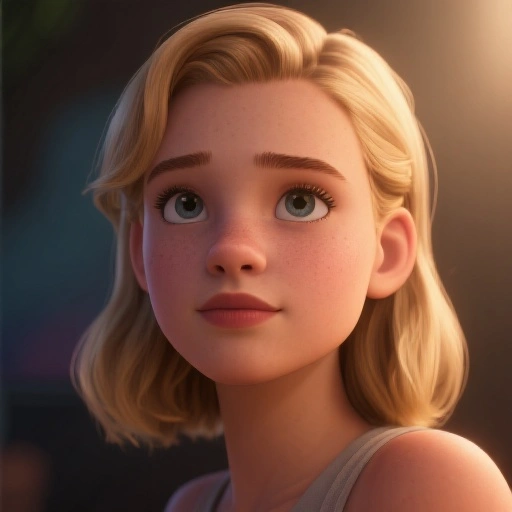
Cinematic 3D Animation
Detailed animated-film 3D with soft, warm lighting. The Pixar-style default.
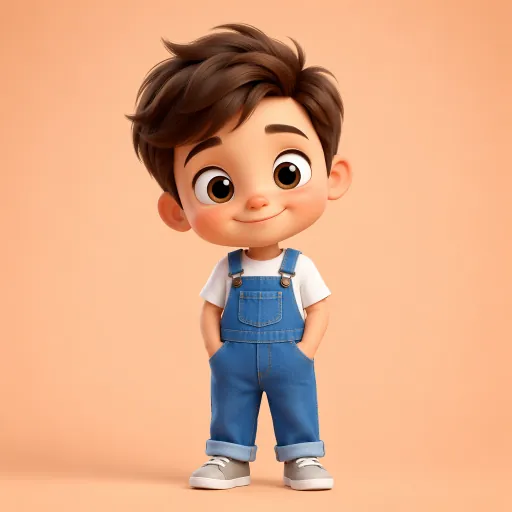
3D Character
Cute, rounded 3D characters with big eyes, great for kids’ stories.
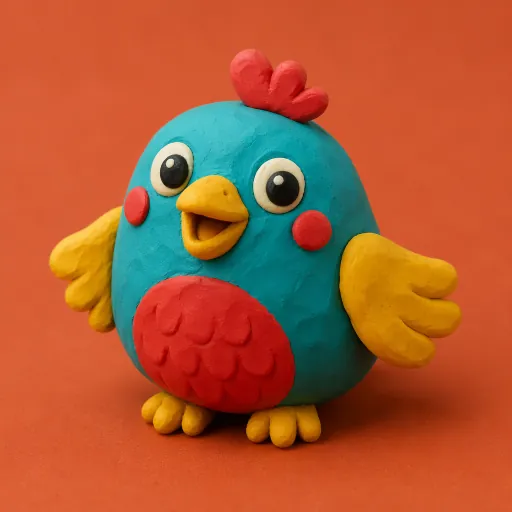
Clay Toy
Bright handmade plasticine characters, like stop-motion clay.
Want a 2D cartoon or anime look instead? AI cartoon video generator · AI anime video generator
How to make a 3D cartoon video with AI
- 1
Write a story idea or paste a script
One line is enough, like “a shy robot learns to dance”, and the AI writes the script for free. Already have one? Switch to Paste a script and it is used word for word.
- 2
Keep the 3D look, pick the length
Cinematic 3D Animation is already selected. Choose 16:9 for YouTube or 9:16 for Shorts, Reels and TikTok, and a length from 15 seconds to 15 minutes.
- 3
Approve your 3D characters
The AI designs up to 3 main characters from your story. Approve them once and each one is rendered from that design in every scene.
- 4
Review, animate and download
Look through the 3D scenes and redraw any you dislike, choose which scenes move, pick a narrator in one of 17 languages, add music and captions, then download the video.
Why use this AI 3D cartoon video generator
A whole story, not one clip
Scenes, narration, music and captions come out as one 3D cartoon video, from a 15-second short to a 15-minute episode. No clip-by-clip prompting and no editor.
The same 3D characters throughout
Every main character is designed once and reused as the reference for each scene, so faces, hair and clothes stay put — the problem people hit most with AI 3D animation.
The animated-film look by default
Cinematic 3D Animation gives soft lighting, depth and expressive faces without writing a long style prompt. Switch to 3D Character or Clay Toy in one tap.
You choose what moves
Animate every scene, or keep some as still 3D illustrations under the narration. Still scenes cost far less, so a long story stays affordable.
Narration in many languages
Pick a narrator in one of 17 languages, music from the library or your own, and captions burned in if you want them.
No watermark, commercial use
Videos have no watermark and can be used on YouTube, in ads and in courses. Each step shows its credit cost first, and failed animations are refunded automatically.
What people make with a 3D cartoon video maker
Kids’ stories and bedtime tales
Animal adventures, fables and stories with a moral, in the 3D look children know from animated films.
Faceless YouTube channels
3D animated story channels in 16:9, or vertical 3D cartoons for Shorts, Reels and TikTok in 9:16.
Lessons for young learners
Turn a lesson, a habit or a value into a narrated 3D cartoon a class will watch to the end.
Series with a recurring cast
Keep the same 3D characters episode after episode by describing them the same way in each story.
Brand and product stories
A short 3D animated story about your product or mascot, without booking an animation studio.
Personal and family stories
A birthday surprise, a family legend or a story your kids made up, rendered like an animated film.
AI 3D cartoon video generator vs other ways to make 3D animation
Three common routes to a 3D cartoon video, and what each one leaves for you to do.
| 3D animation software | ToonBee AI 3D cartoon video generator | AI clip generators | |
|---|---|---|---|
| You start from | Modeling, rigging and animating by hand | A story idea or a whole script | One prompt per shot |
| Time to a finished video | Weeks to months | Minutes of waiting | Hours of prompting and stitching |
| Length | As long as you can animate | 15 seconds to 15 minutes | 5–10 second clips |
| Characters across scenes | Fixed models you build | Designed once, reused in every scene | Often drift between clips |
| Narration and music | Recorded and edited separately | Included | Usually added separately |
3D software gives full control and is the right tool for a studio film. Clip generators suit a single striking shot. For a told story in a Pixar-style 3D look, generating the whole video saves the modeling and the stitching.
Is there a free AI 3D cartoon video generator?
Partly. Creating an account and writing the script are free: write and rewrite as many 3D cartoon stories as you like without spending anything.
Rendering the 3D scenes, the narration and the animation use credits. A 60-second 3D cartoon video is about 232 credits with still 3D scenes and a narrator, or about 1,732 with every scene animated.
Plans start at $39 a month for 5,000 credits, about 21 minutes of narrated 3D stories with still scenes. Each step shows its cost before you confirm, and failed animations refund their credits automatically.
Good to know before you start
- One narrator tells the story. Characters do not speak lines to each other, and there is no lip sync.
- The 3D characters are designed from your description. It does not turn a photo of you or your family into a 3D character.
- Up to 3 main characters are fixed per story; crowds and extras are drawn scene by scene.
- Each animated scene is a short shot of 5 to 15 seconds, so long stories are told in more scenes.
AI 3D cartoon video generator FAQ
Is there a free AI 3D cartoon video generator?
Writing the script is free with a free ToonBee AI account, and you can rewrite it as often as you like. Rendering the 3D scenes, narration and animation uses credits from a plan or a one-time pack, and each step shows its cost before you confirm.
Can AI make a Pixar-style 3D cartoon video?
Yes. The Cinematic 3D Animation style renders every scene in a soft-lit, animated-film 3D look with expressive, rounded characters, the look people usually mean by Pixar style. ToonBee AI is not affiliated with Pixar or Disney, and it does not copy their characters.
How do I make a 3D cartoon video with AI?
Type a story idea or paste a script, keep the Cinematic 3D Animation style, pick the length and screen shape, approve the characters the AI designs, then review the scenes, choose which ones move and download the video with narration and music.
How long can a 3D cartoon video be?
From 15 seconds up to 15 minutes. The script sets the length; longer stories are split into more scenes, each animated as a short shot.
How much does a 3D cartoon video cost?
A 60-second 3D cartoon video is about 232 credits with still 3D scenes and a narrator, or about 1,732 with every scene animated. The script is free, and failed animations are refunded automatically.
Will my 3D characters look the same in every scene?
Yes, that is what the generator is built for. Up to 3 main characters are designed once, before any scene, and every scene is rendered from that design, so faces, hair and clothes stay consistent.
Which 3D styles can I choose?
Cinematic 3D Animation (the default animated-film look), 3D Character (cuter, rounder characters with big eyes) and Clay Toy (handmade plasticine). The same story can also be made in 2D cartoon, anime, watercolor and many other looks.
Can the characters talk?
Not yet. A narrator tells the story, in one of 17 languages, over music you choose. Characters do not speak lines to each other and there is no lip sync.
Is there a watermark, and can I use the videos commercially?
Videos have no watermark, and you can use the 3D cartoon videos you make commercially, including on YouTube, in ads and in courses. Follow each platform’s rules for AI-generated content.
Do I need 3D software or animation skills?
No. There is no modeling, rigging or timeline. Everything runs in your browser; if you can describe a story, you can make the 3D cartoon.
Make your first 3D cartoon video
Write one line or paste a script. The AI 3D cartoon video generator does the 3D characters, the scenes, the animation and the narrator.
Start your 3D cartoonRelated tools
Other pages that open the same studio, set up for a different kind of video.
- AI Cartoon Video GeneratorTurn an idea or a script into a narrated cartoon video.
- AI Anime Video GeneratorStory videos drawn in an anime style, with narration.
- AI Animation GeneratorShort animated clips, or a still image brought to life.
- Script to Video AIPaste a finished script and get an animated video back.
- AI Children's Story GeneratorWrite a children's story and turn it into a video.
- AI Story Video GeneratorAny story, told in the art style you pick.