
MiniMax H3 Prompting Guide: Format, Dialogue, Camera and Examples
How to write MiniMax H3 prompts that work: the official three-part format, shot timing, dialogue tags, camera terms, sound, image and reference modes, with six example prompts and the videos they made.
MiniMax H3 follows a prompt closely when the prompt is written the way the model was trained to read it, and loosely when it is not. That is the short version of most "H3 ignored my prompt" threads: the wording was fine, the shape was wrong.
This guide covers both shapes. The first is a plain-English brief, which is enough on any hosted service that rewrites your prompt before rendering. The second is MiniMax's own structured format — three labelled fields, numbered shots, tagged dialogue — which you need when you run the open weights yourself and which gives you exact control anywhere else. Every rule below comes from MiniMax's published writing guides or from the guides fal and ComfyUI wrote for the model; where they disagree, we say so.
Quick answer
For a quick prompt, describe one shot: the style, who is in it, the main action, the camera, the light and the sound, and put any spoken line in quotes. Say how long the clip is.
For full control, use MiniMax's format:
integrated_multimodal_description: [Shot 1] <style>, <framing> ... [Shot 2] At 00:04.000, the camera cuts to ...

overall_soundscape: <ambience and physical sounds, 1–4 sentences>

non_diegetic_music: <background score, 1–3 sentences, or N/A>
The rest of this guide explains each part, then shows six prompts with the clips they produced.
Why the format matters
MiniMax's hosted H3 does not feed your words straight to the video model. A preprocessing system it calls H3-Context-IR reads the prompt and any images, video or audio you attached, works out how they relate, and serializes all of it into a structured representation that the base model accepts. MiniMax did not include that system in the open-weights release, because it runs on several hosted models and services. Its open-source announcement calls it critical to output quality and tells developers to either use it or follow the prompting guidance to build their own.
That guidance is two documents on Hugging Face: a writing guide for the base modes (text, first frame, first and last frame, last frame) and a guide for full-reference mode. MiniMax also packages both as an agent skill on GitHub.
What this means in practice:
- On the open weights (ComfyUI or your own code), nothing rewrites your prompt. A loose sentence goes in as a loose sentence. Write the structured format, or have a language model rewrite your idea into it using the guide above.
- On a hosted service, a rewriting step usually runs first. fal's H3 Max endpoints, for example, take a
prompt_expansion_modesetting:disabled,balanced(about a second) orquality(up to about 30 seconds). ToonBee AI runs H3 Max and H3 Max Turbo — fal's post-trained versions of H3 — withbalancedon, so a clear plain-English brief works. The structured format still helps when you need exact cut times, several speakers or a precise soundtrack.
The simple formula
For a single shot on a hosted service, cover these in roughly this order:
- Style — live-action, 2D-animated, 3D CG, claymation, watercolor, vintage film. MiniMax's guide puts the style first.
- Subject and setting — who or what, where, and the details that must stay the same.
- One main action — written as physical movement. "He lunges and catches it" beats "action scene".
- Camera — one move, with its speed if it matters: "the camera pulls back slowly".
- Light — "soft white daylight", "candlelight that jumps with every movement".
- Sound and speech — what we hear, and any line in quotes, attributed to who says it.
- Length — "Exactly 5 seconds" or "a 5-second shot" keeps the action sized to the clip.
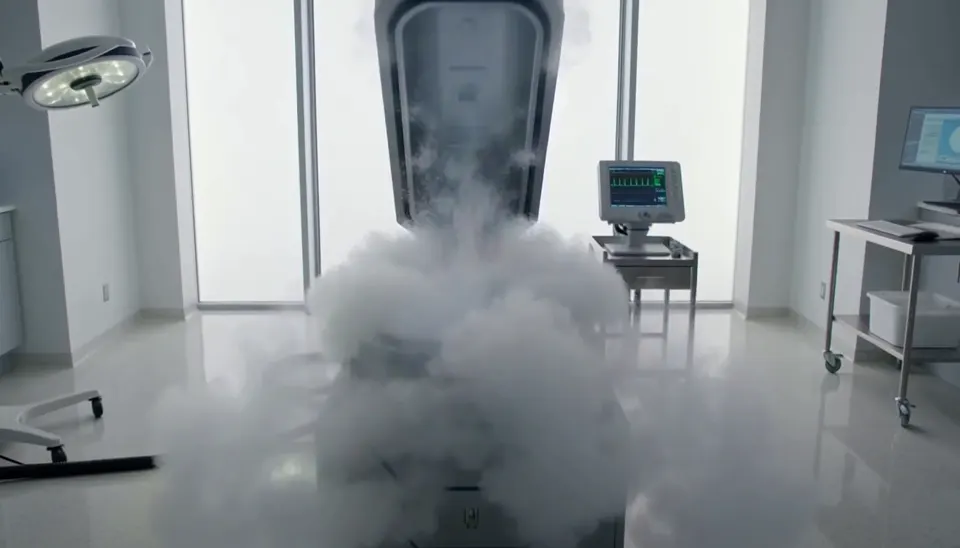
Here is that formula in a real prompt, rendered on H3 Max at 768p. Turn the sound on: both lines are voiced and lip-synced from the text alone.
Exactly 5 seconds. Inside a bright sterile laboratory, a cryogenic chamber opens and cold vapor spills across the floor. A confused man slowly sits up. A scientist steps forward and says, "Welcome back." The man asks, "What year is it?" The scientist hesitates as the camera gently pulls backward. Photorealistic Hollywood science-fiction drama, soft white daylight, realistic vapor, restrained acting, accurate lip sync, no extreme close-up.
The official structure
MiniMax's base guide defines the final prompt as up to two parts: an optional instruction line for image modes, then three fields in a fixed order.
| Field | What goes in it |
|---|---|
integrated_multimodal_description | The main body. Everything visible and audible along the timeline: style, composition, subjects, actions, shots and cuts, camera moves, who speaks, the dialogue, and sounds tied to a specific moment. |
overall_soundscape | 1–4 sentences summarizing ambience, physical sounds and non-verbal human sounds (breathing, laughter, footsteps) across the whole clip. No dialogue here. N/A only if the clip should be completely silent. |
non_diegetic_music | 1–3 sentences on score that only the audience hears: instruments, tempo, rhythm, how the volume changes. No mood words. N/A if there is none. |
The guide asks for every detail to be something you could see or hear. Its skill file adds the same point from the other side: prefer concrete visual and audio details over abstract words such as "cinematic" or "beautiful".
Write the prompt in English. Dialogue, lyrics and any text that appears on screen stay in their original language, copied exactly.
Shots and timing
The first shot opens with [Shot 1] and no timestamp. Each later shot gets the next number and a cut time that keeps increasing and falls inside the clip's length:
[Shot 1] Live-action, cinematic, a medium-wide shot frames ...
[Shot 2] At 00:03.500, the camera cuts to a close-up of ...
Two rules from the guide are easy to miss. A cut should bring something new — a different subject, space, viewpoint or moment. If you only want to get closer or shift the angle a little, use a camera move instead. And the timeline you describe should add up to the length you request: H3 runs 4 to 15 seconds depending on the service (5 to 15 on ToonBee AI), and a 12-second story crammed into a 5-second clip will be rushed or cut short.
fal's guide shows a looser version that works on its hosted endpoints — timecoded blocks such as [0 to 2 seconds] High-angle overhead shot... [2 to 4 seconds] Smoothly push in... — and says H3 follows the structure and keeps the pacing from drifting into a slideshow. Use whichever you find easier; the official form is the one the open weights expect.
Camera moves
The guide describes a camera move in three parts: the type of move, its amplitude (how much the framing changes) and its speed. Leave amplitude and speed out when they are ordinary.
- Moves: zoom in / zoom out (lens only), push in / pull out (camera travels), pan left / right, truck left / right, tilt up / down, pedestal up / down, arc shot, tracking shot, static shot, shake slightly / strongly, POV, roll clockwise / counterclockwise.
- Amplitude:
with small amplitude,with large amplitude. - Speed:
at slow speed,at fast speed.
Write the move as a sentence inside the shot, not as a list of tags at the end: "The camera pushes in with small amplitude at slow speed toward the letter in her hands." fal adds that H3 reads film vocabulary directly — lens choice, rack focus, handheld shake, grain and halation all translate — and that transitions land better described as physical events ("whip movement, motion blur… cut at peak blur") than named as effects.
Dialogue and speakers
In the structured format, every voice gets a stable ID — (S1), (S2) — that it keeps across shots. Characters who never speak get none. When a speaker first appears, describe them well enough to pin the voice down: age, gender, pitch, timbre, pace, accent. The spoken words go inside <d> tags with a language tag, and nothing else goes inside:
The old fisherman with a low, gravelly voice (S1) says: <d>[English] Storm's coming in early.</d>
The two children (S1,S2) shout together, <d>[English] Wait for us!</d>
Voiceover has its own fixed wording — says in an off-screen voiceover — followed by a note that the on-screen character's lips stay closed. A line that carries over a cut is marked with <scenetrans> at both ends; a line cut off by the end of the clip is marked <cutoff>.
In a plain-English prompt, quotation marks do the same job, as the lab clip above shows. Two habits help either way: name exactly who says each line, and keep the line short enough to be spoken in the time you have. RunDiffusion's guide makes the same point.
On-screen text
Anything printed in the scene — a sign, label, banner, subtitle or neon — goes in English double quotes, copied exactly and not translated: A red neon sign reading "OPEN LATE" glows above the door. ComfyUI's guide adds: list each string separately, and keep quotes for printed text and <d> for speech.
Small lettering is one of the things reviewers say H3 still gets wrong — it can wobble or blur. Fewer, shorter, larger strings fare better than a paragraph of fine print.
Sound
Because H3 makes picture and sound in one pass, fal's advice is to direct the audio the way you direct a shot: name the sounds ("ice lightly tapping crystal, subtle room air, clothing movement") and, for music, the instruments and how they change over time. The official guide splits this into the two audio fields above and keeps them apart: dialogue and sounds tied to a moment go in the main description; the bed of ambience goes in overall_soundscape; score only the audience hears goes in non_diegetic_music. Music the characters can hear — a radio, a singer in the room — belongs in the main description.
ComfyUI's guide has a practical fix here: if a quiet shot comes back with speech you did not ask for, write both audio fields out explicitly and generate again.
Image, first-and-last-frame and reference prompts
The same body works across modes. What changes is how you tell H3 what the images are for.
Image to video (first frame). Describe what is already in the image first — style, subject, composition — then what happens next. The guide's order is: first-frame anchor, the action starting, how it develops, the result. Keep identity, clothing, colors and layout the same unless you mean to change them. On the open weights the prompt also opens with a fixed line, followed by a blank line:
For the target video, at 0.00 seconds into the target video, <Picture 1> (from [Shot 1]) is fully referenced.
On a hosted tool the image is already attached as the opening frame, so plain language is enough. This clip started from a still and a description of motion only:
She spins. A woman in flowing ivory silk turns hard through a violent updraft of white feathers, her skirt flaring wide and heavy as it whips around her legs, sleeves snapping like sails. She throws her head back, hair breaking loose from its pins and streaming sideways, then drops her chin and opens her eyes — laughing. Her outstretched arms sweep down and across, carving visible channels through the feather storm, dragging spiral vortices behind her fingertips. Feathers explode outward on each rotation, some slamming against the lens, others caught and flung upward by the momentum of her skirt. She plants one foot, pivots, and reverses direction; the fabric lags a half-beat behind her body, then catches up and slams around her hips. The light surges from dim to blazing as the storm parts.
First and last frame. Don't describe the two images again — describe the path between them: how the subject moves, how poses and objects change, how the framing and light shift, until the differences narrow to the final frame. MiniMax's guide says this mode generally works best as a single shot. On fal's endpoints a plain opening line does the job, as in its own example: "Use the first image as the exact opening frame and the second as the exact ending frame." The official guide also covers a last-frame-only mode, where the prompt invents a plausible lead-up and lands on the image; ToonBee AI offers first frame and first-and-last frame.
Reference to video. Here you attach up to 9 images, 3 video clips and 3 audio clips (12 files at most) and say what each one is for. fal calls this the single highest-leverage habit: "Use Image 1 for the overall mood, location, and film texture; Image 2 for the talent; Image 3 for the bag" is far stronger than four images and a description. Then name the features that must survive — fal's example lists the hair, crown, ribbon and every layer of the costume — because naming them gives the model something concrete to hold.
MiniMax's full-reference guide formalizes this into six sections (subject definitions, a summary, a retention analysis, the detailed description and the two audio fields) with labels such as <Subject 1>, <Picture 1>, <Video 1> and <Audio 1>, and suggests 350–500 English words for the description. On fal's endpoints, and on ToonBee AI, you cite references as "Image 1", "Video 1" and "Audio 1" in the order you add them; reference mode is on H3 Max only, not Turbo.
Negative prompts
H3 has no separate negative-prompt field — neither fal's endpoints nor the ComfyUI templates take one. The two guides differ on what to do instead:
- ComfyUI explains that on the local templates a line such as "no subtitles and no on-screen text" simply adds text to what the model reads, so it can make the thing more likely. Its advice: say what should be there instead — "the sign above the door is blank".
- fal reports that on its hosted endpoints, specific exclusions inside the prompt work well: "No soft dissolves or fluid morphs", "No tearing, black frames, hard cuts".
Start with the positive version. If an unwanted element keeps coming back on a hosted service, add one specific exclusion and compare.
Fixing the common problems
The character changes partway through. Users report that without an anchor, a face can drift over a long take. Start from an image or use reference images, and name a few stable features in the prompt — face shape, hair, a distinctive item of clothing. RunDiffusion's guide traces most drift to two causes: references that disagree with each other, or identity details that were never stated.
Fast motion turns to blur. Keep one main action per clip, give a fast action its own shot rather than packing several into one, and set the camera speed explicitly. The apple clip below shows how far a single, well-described action can go.
Small text wobbles. Quote it exactly, keep it short, and keep it to one or two strings.
Unwanted dialogue or music. Write both audio fields out, with N/A for music if you want none.
A line lands on the wrong speaker. Give every speaker an ID and a voice description, and tie the line to something visible — ComfyUI's example is "when the phone is at his ear, the man in the coat speaks" — rather than to a timestamp.
Six MiniMax H3 prompt examples
Each of these was rendered on H3 Max at 768p, sound included. They show the range: one is a single line, one is a structured beat list.
1. Physical action, one subject. Every clause is movement: the mistimed catch, the fabric reacting, the light following the motion.
He explodes upward out of the black. Both arms drive toward the falling apple, body twisting, white linen sleeves snapping taut then bunching as his shoulders roll. The apple tumbles fast, end over end, its stem whipping. He mistimes it — the fruit glances off his fingertips and spins away; he lunges after it, throwing his weight sideways, hair swinging across his face, eyes flashing wide. He catches it hard against his palm, the impact shoving his arm back and down, linen collapsing in loose folds. He pulls it in against his chest, breathing hard, and breaks into a grin as he looks straight into the lens. The candlelight jumps with every movement, flaring across his forearms and guttering into darkness behind him.
2. One spoken line. Length, setting, framing, the line in quotes, then the look — and two exclusions to keep the framing wide and bright.
Create a 5-second live-action Hollywood film shot in a bright university library. A thoughtful professor stands in a medium shot, turns slightly toward an unseen student, and calmly says, "What is the real?" Natural daylight, professional cinema camera, realistic performance, subtle camera drift, no close-up, no dark lighting, perfect lip sync.
3. Two characters talking — the lab clip earlier in this guide.
4. Image to video — the feather clip earlier in this guide.
5. A beat list for anime action. This one starts from an image and lists named beats, each with its own camera move. It lists more beats than five seconds can show, which is fine for exploring a look; for a planned sequence, give each beat a timestamp and a longer clip.
A serene woman warrior with a long silver-white braid and pale grey eyes, wearing flowing translucent white robes layered over slim silver armor. She stands alone in the mirror-still flooded courtyard of an abandoned mountain shrine at night. Fine misting rain, moonlight breaking through cloud, faint blue spirit-lights drifting in the air, her reflection perfect in the water. She holds a single crystalline naginata that glows soft white from within. Fluid sword combat, graceful sweeping camera movements, dramatic close-ups, luminous sparks trailing each strike, petals and mist displaced by the blade, elegant choreography, cinematic lighting, anime movie quality, highly detailed backgrounds, ultra smooth motion, ethereal atmosphere, speed lines, energy waves, volumetric moonlight, masterpiece anime action sequence, breathtaking final strike
Stillness — She stands motionless, head lowered, rain beading on her shoulders. Slow push-in. Her eyes snap open, violet light flaring. Volumetric light, ultra detailed.
The draw — Iaido draw in one fluid motion; the crystal blade sings and throws a ring of prismatic light outward. Low-angle tracking shot, slow motion into normal speed.
Opening rush — She explodes forward, feet skimming the wet ground, spraying water in twin arcs. Fast dolly chase behind her, heavy speed lines.
First exchange — Rapid three-strike combo against an unseen force; sparks burst off the blade, crystal trees shatter behind her. Whip-pan, handheld shake.
Aerial spiral — She kicks off a glass trunk, spins midair, and slashes downward. Orbital camera rotating around her, shards suspended in the air.
6. A one-line idea. On a hosted service with prompt rewriting, a vivid premise can be enough. This 10-second clip came from one lowercase sentence — useful for exploring, less so when you need control.
minecraft creative mode but in real world. in new york city.
Copy-ready templates
Swap in your own subject. These follow MiniMax's format; on a hosted service you can paste them as they are.
Text to video, two shots with dialogue (8 seconds):
integrated_multimodal_description: [Shot 1] 2D-animated, a medium-wide shot frames a small red fox in a green scarf at the edge of a snowy forest at dusk, beside a wooden signpost. The camera pushes in with small amplitude at slow speed as the fox brushes snow off the sign, revealing the words "HOME 2 MI". The fox, with a bright, slightly hoarse young voice (S1), says: <d>[English] Two more miles. I can do two more miles.</d> [Shot 2] At 00:04.500, the camera cuts to a wide shot from behind as the fox trudges down the path between tall pines, his scarf trailing in the wind, while the sky fades from orange to blue.

overall_soundscape: Wind moves through the pines and snow crunches under small paws. A branch creaks once, and the fox lets out a short breath.

non_diegetic_music: A solo celesta melody at a slow tempo over soft string pads, rising slightly as the fox sets off and fading out at the end.
Image to video (open weights; on a hosted tool drop the first line):
For the target video, at 0.00 seconds into the target video, <Picture 1> (from [Shot 1]) is fully referenced.

integrated_multimodal_description: [Shot 1] 3D CG, the girl in the yellow raincoat shown in <Picture 1> stays at the bus stop, keeping her face, raincoat, red boots and the street layout unchanged. The camera holds a static shot as she looks up from her phone, sees the bus approaching off-screen left, and jumps over a puddle toward the curb. Water splashes up around her boots as she lands and laughs.

overall_soundscape: Steady rain on the bus-stop roof, a splash as she lands, and the hiss of bus brakes approaching.

non_diegetic_music: N/A
First and last frame (hosted, plain language):
Use the first image as the exact opening frame and the second as the exact ending frame. One continuous 6-second shot, live-action. The camera pulls out with small amplitude at slow speed as the baker lifts the tray from the oven, turns, and sets the loaves on the wooden counter, ending in the composition of the second image. Oven door clanks shut, tray scrapes on wood, quiet bakery ambience. No music.Reference to video (H3 Max):
Use Image 1 for the character: keep her short black bob, round glasses, freckles and mustard-yellow cardigan exactly. Use Image 2 for the location and lighting: the corner bookshop with warm lamps and rain on the window. 2D-animated, a medium shot. She pulls a red book from the top shelf, blows dust off the cover and smiles, saying, "Found you." Rain patters on the glass; pages rustle. Soft piano at a slow tempo.FAQ
What is the best prompt format for MiniMax H3?
MiniMax's official format: an integrated_multimodal_description field with numbered, timed shots, then overall_soundscape and non_diegetic_music. It is required for good results on the open weights, which ship without MiniMax's prompt preprocessor. On hosted services that rewrite prompts, a clear one-shot brief in plain English also works.
Does MiniMax H3 support negative prompts?
There is no separate negative-prompt field. ComfyUI recommends describing what should appear instead, since an exclusion adds the unwanted word to the prompt on the local templates; fal reports that specific exclusions inside the prompt work on its hosted endpoints. Try the positive phrasing first.
How do I write dialogue in a MiniMax H3 prompt?
In plain prompts, put the line in quotes and say who speaks it. In the official format, give each speaker an ID such as (S1), describe their voice, and put only the language tag and the words inside <d> tags: (S1) says: <d>[English] Welcome back.</d>. Keep each line short enough to say in the time available.
Can I write MiniMax H3 prompts in other languages?
MiniMax's guide asks for the prompt itself in English, with dialogue, lyrics and on-screen text kept in their original language. So a Spanish line is written as <d>[Spanish] ...</d> inside an English description.
How long should a MiniMax H3 prompt be?
As long as the clip needs and no longer than it can play. fal's guide gives H3 room for 7,000 characters; ToonBee AI's prompt box takes up to 5,000. MiniMax suggests 350–500 English words for the description in full-reference mode. What matters more is that the timeline you describe fits the 5–15 seconds you request.
What is a MiniMax H3 prompt enhancer?
A step that rewrites a short prompt into a fuller one before rendering. MiniMax's hosted version is H3-Context-IR, which is not in the open-weights release; fal offers prompt_expansion_mode on its H3 Max endpoints. ToonBee AI runs fal's balanced setting on every H3 request. Running the weights locally, you can use MiniMax's prompt-writing skill with your own language model.
How do I stop characters drifting in MiniMax H3?
Anchor the character with a first-frame image or reference images, and name the features that must not change — face, hair, clothing. Make sure your references agree with each other.
Try these prompts
ToonBee AI runs H3 Max and H3 Max Turbo, fal's post-trained versions of MiniMax H3, in the browser: text to video, a first frame, first and last frames, and reference images on H3 Max, with sound and lip-synced dialogue in the same pass. New accounts get free credits, and the credit cost is shown before you generate. We are independent and not affiliated with MiniMax.